Midnight desk with a laptop and ad creative
Slide 01
Session 1

Install your ad machine

Get your tools installed and your Meta account connected.

Open the Session 1 guide
Slide 02
Session 1

Start with the focus walkthrough

  • Open the focus walkthrough prep in the guide.
  • The Session 1 replay follows it.
  • Keep your course folder and project notes together.
Open focus walkthrough and replay
Slide 03
Session 1

Get the machine ready

  • Meta Ads agent installed and checked.
  • All Sorted Content Studio installed and checked.
  • The correct Meta account connected and confirmed.
  • Actual blockers saved with one next action.
Slide 04
Session 1

Four sessions, one useful system

  • Session 1: install the tools and connect Meta.
  • Session 2: tracking, consent and three ads published paused.
  • Session 3: variations, video, audiences and activation readiness.
  • Session 4: review results and improve using evidence.
Slide 05
Session 1

Three pieces work together

  • Claude Code: uses your approved AIOS context.
  • Meta Ads agent and connector: plan, act and verify in Meta.
  • Content Director and Studio: write, make and review creative.
Slide 06
Session 1

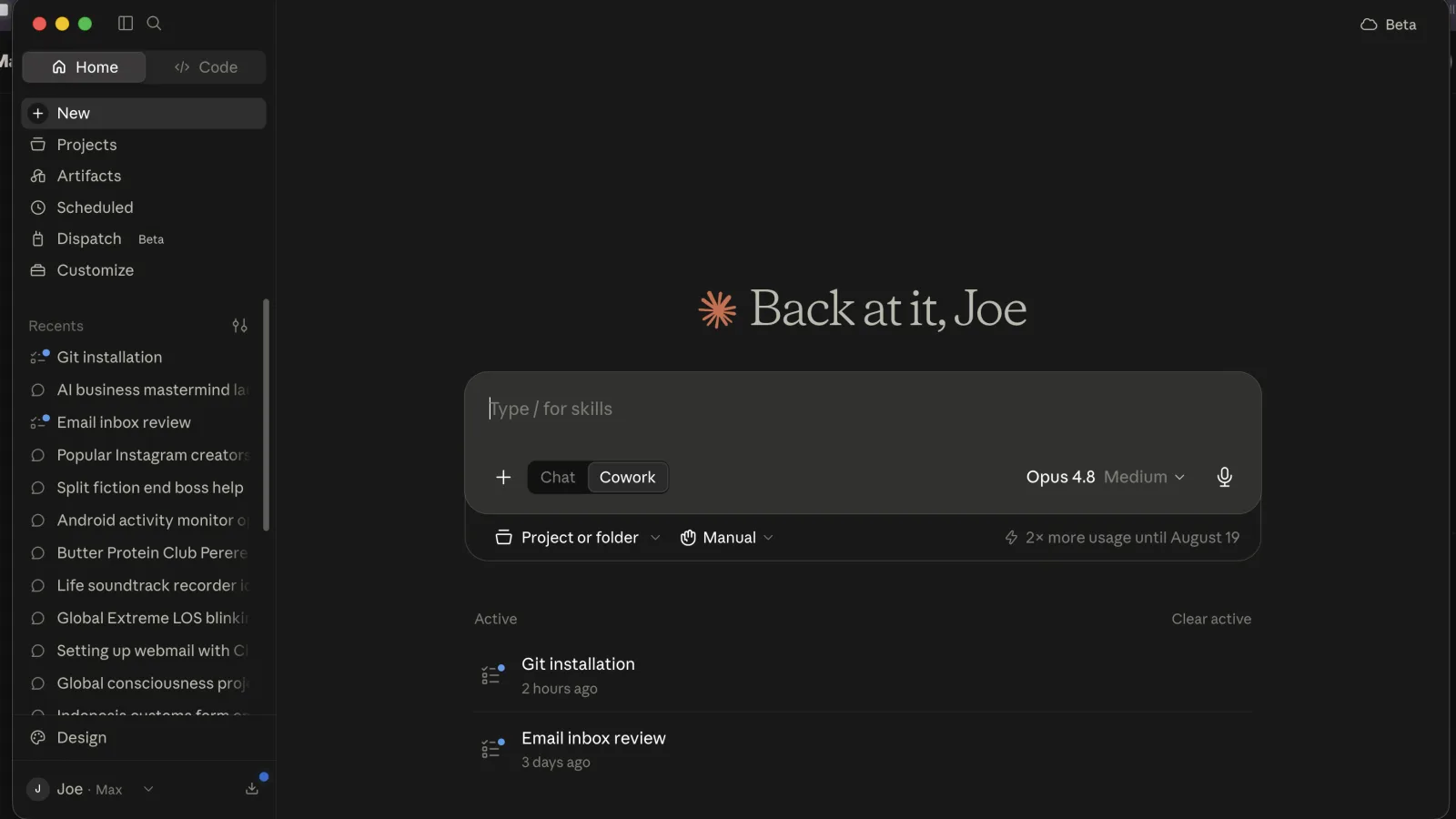
Open Claude Desktop
First course example
Second course example
Slide 07
Session 1

One prompt, both tools

  • Copy the current install prompt from the guide.
  • It checks your computer, folders and dependencies.
  • It preserves existing work and verifies real outputs.
  • Review installed, failed and sign-in-pending results separately.
Open the install prompt
Slide 08
Session 1, Step 2A

Add Meta's official connector

  • Settings > Connectors > Add custom connector.
  • Name: Meta Ads.
  • Server URL: https://mcp.facebook.com/ads.
  • Follow the detected sign-in settings.
Slide 09
Session 1, Step 2B

Authorize the right business

  • Choose the identity and assets for this business.
  • Review access, Save, then return to Claude.
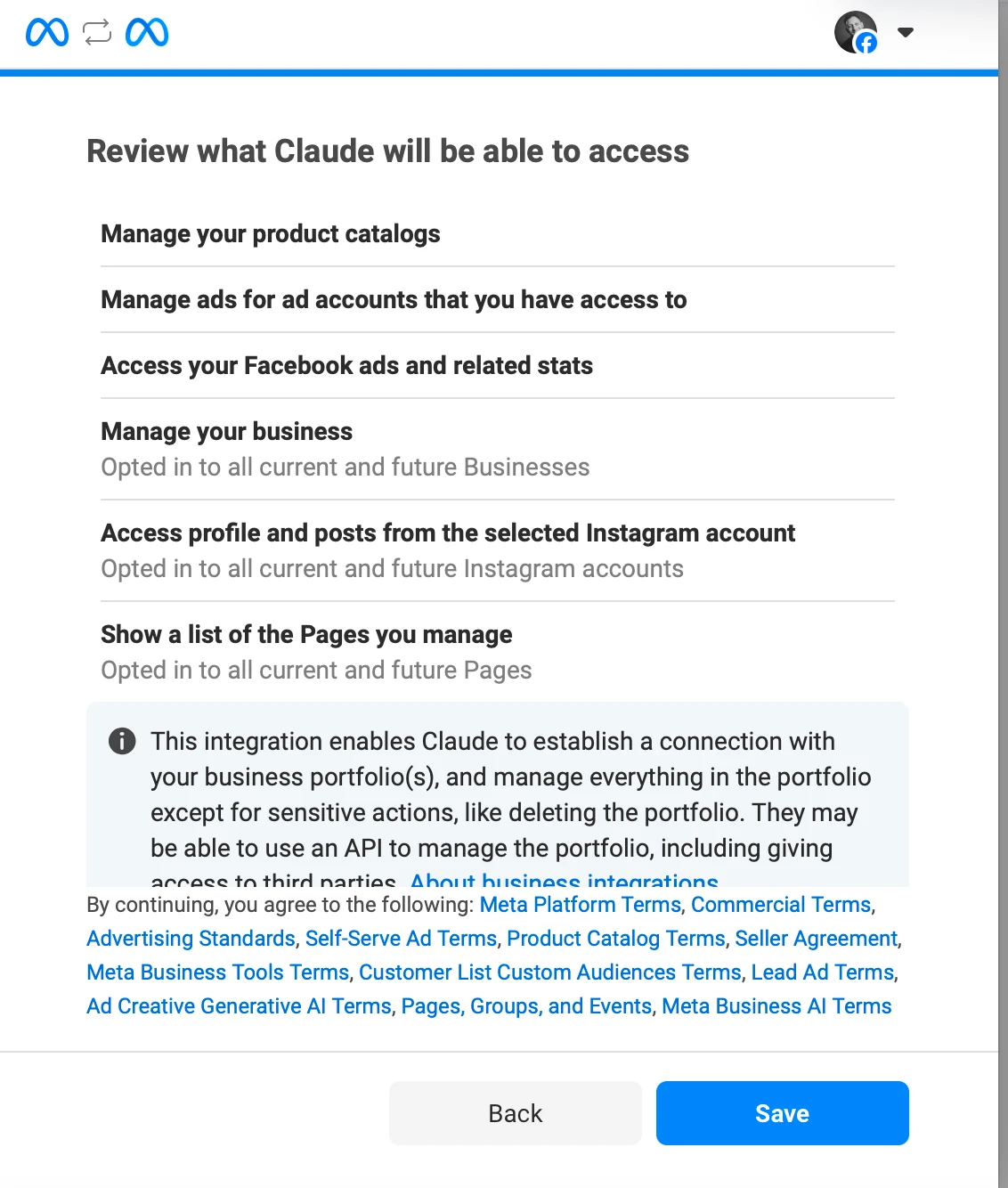
Meta review of permitted business assets
Slide 10
Session 1, Step 2C

Set tool permissions
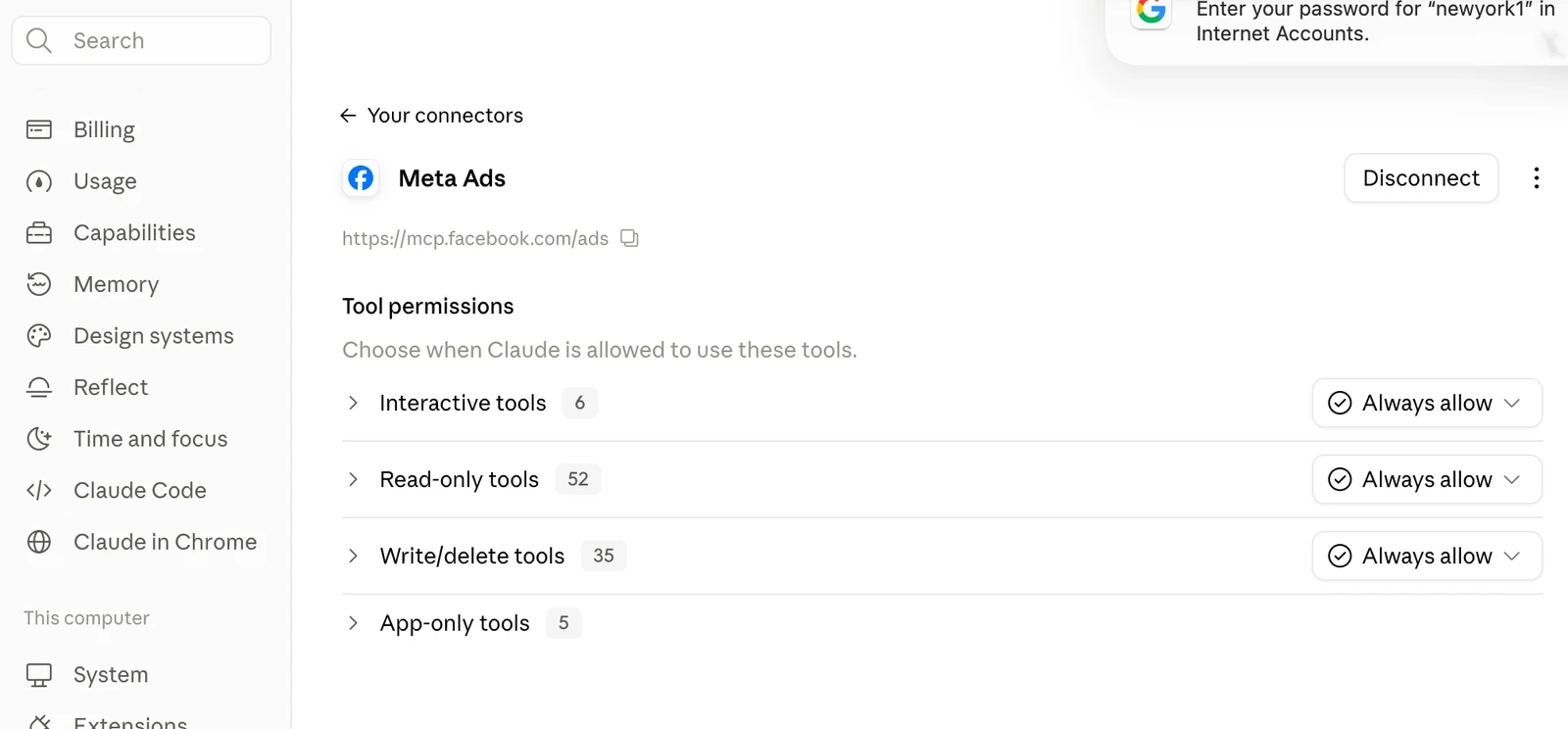
Interactive, read-only and write-delete tool permissions
Slide 11
Session 1, Step 2D

Allow the account's Meta actions
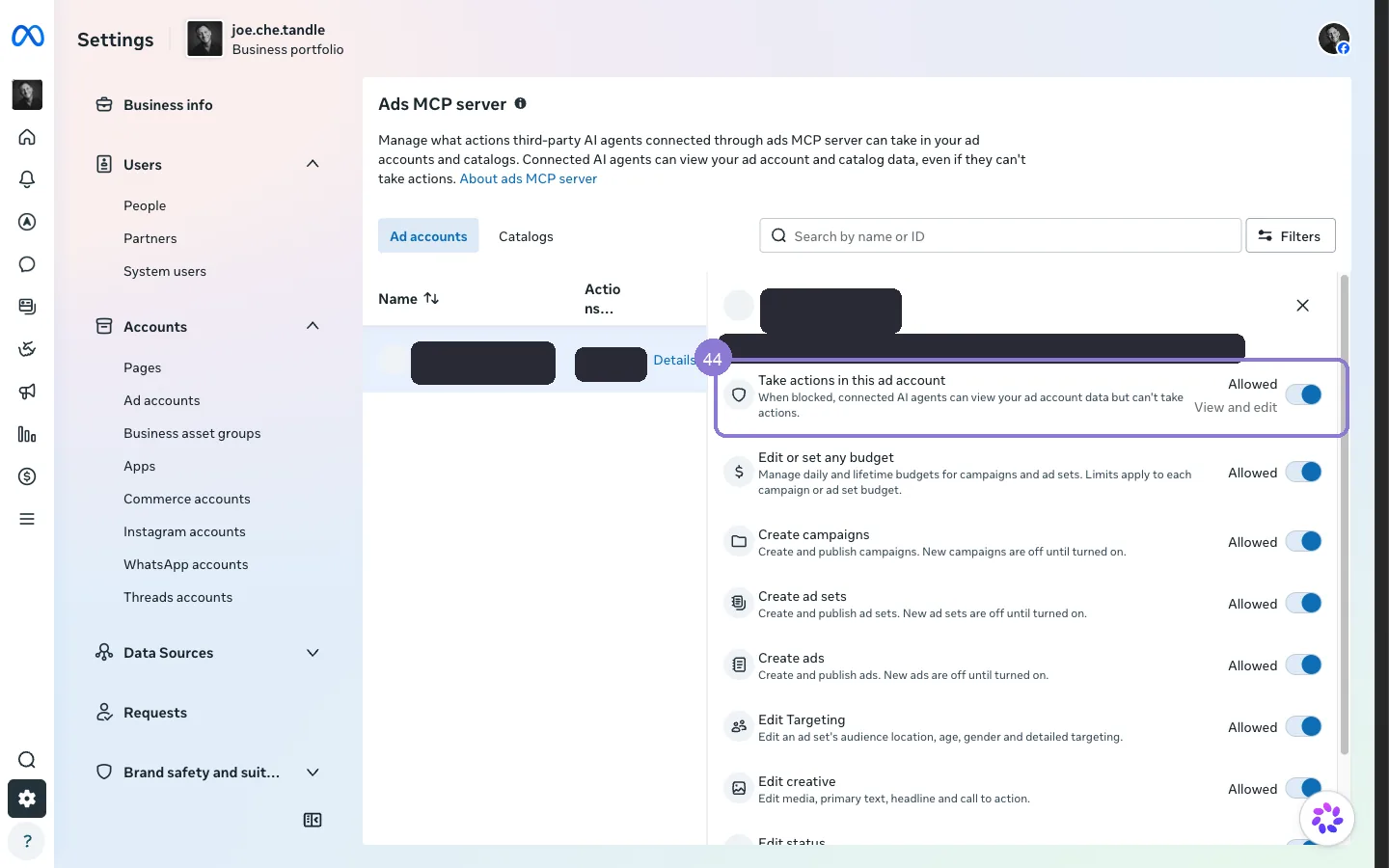
Meta Business Settings Ads MCP server account actions
Slide 12
Session 1

Check my Meta Ads connector

  • Claude discovers the business from approved AIOS sources.
  • It confirms the account, currency and time zone.
  • It tests this chat's read access without changing ads.
  • Missing essentials get one focused question.
Open the connection check
Slide 13
Session 1

The long way, only if needed

  • Use the collapsed alternative if the official route is unavailable.
  • The guide covers the developer app, assets and guarded API setup.
  • Keep tokens out of chat and preserve private write controls.
Slide 14
Session 1

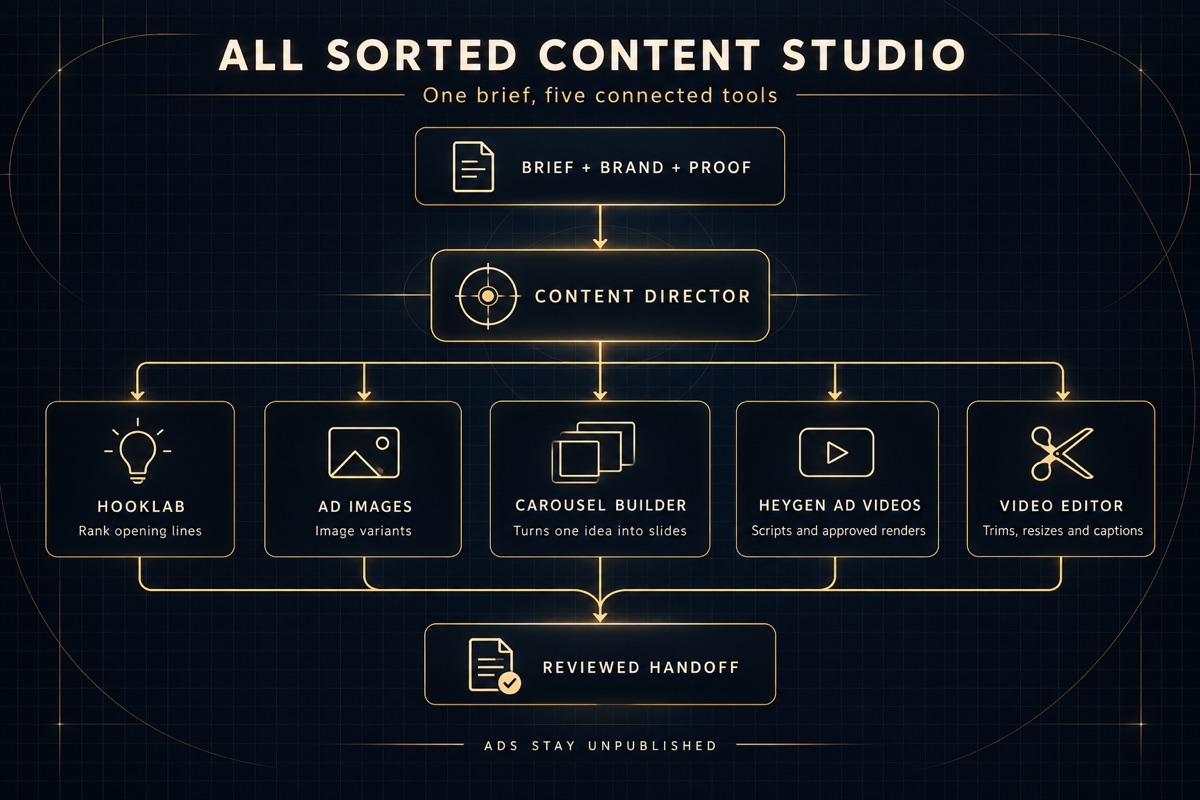
One director, five tools

Content Director coordinates five creative tools
Slide 15
Session 1

Installed is a verified result

  • Check the actual folder and installed version.
  • Confirm tools are discoverable in your current chat.
  • Show a real render and its review result.
  • Separate local readiness from pending authentication.
Slide 16
Session 1

Bring one clear starting point

  • Finish recorded install or access blockers.
  • Bring one offer, its destination and known economics.
  • Keep brand, voice and relevant project context accessible.
  • Keep every Meta campaign off.
Open Session 1 post-session tasks
Slide 17
Session 1

Your ad machine is ready to build

  • Tools installed, or their exact blockers recorded.
  • Account connection checked, with evidence.
  • Notes saved for the next session.
Masterminds HQ members
Slide 18
Session 1
Continue to Session 2

What is working on your machine now?

What exact blocker should you bring to Session 2?

Midnight workstation for building an ad campaign
Slide 19
Session 2

Building our first ads

Tracking and consent, then two static ads and one carousel, published PAUSED.

Open the Session 2 guide
Slide 20
Session 2

Follow the customer journey
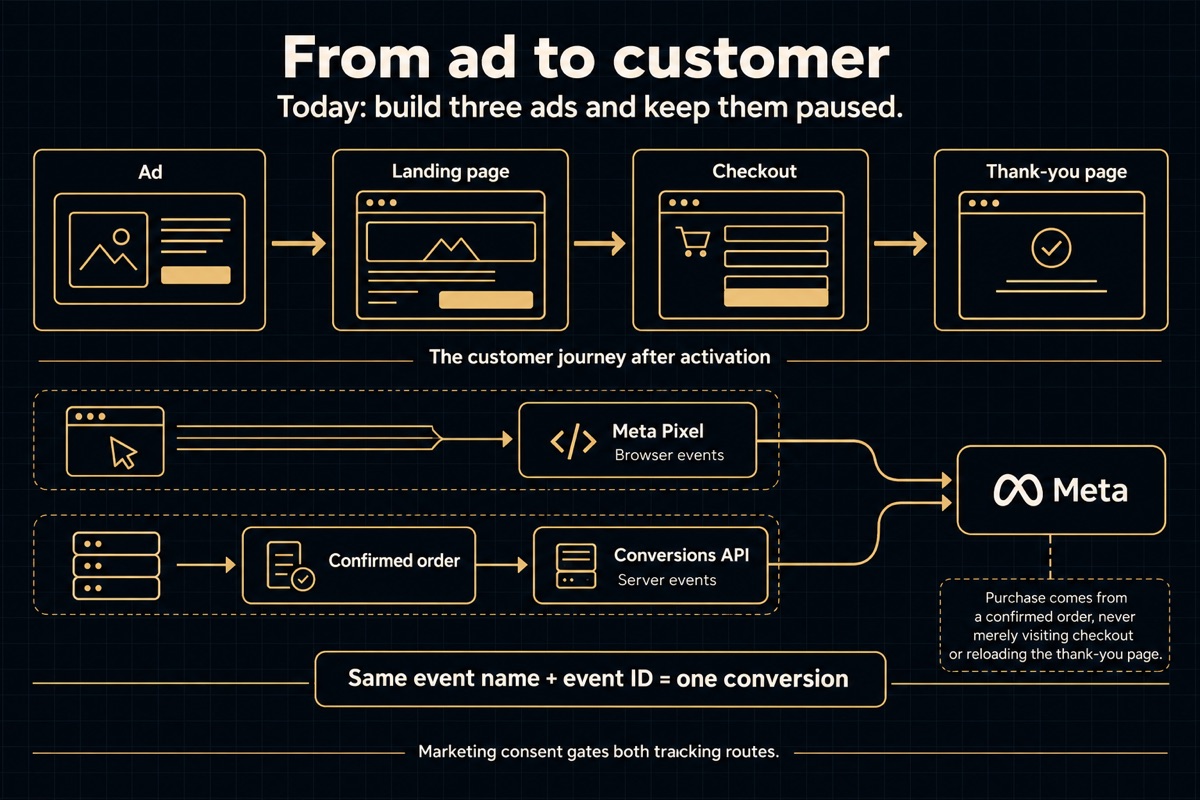
Ad to landing page, checkout and confirmation with browser and server tracking
For services, the form and confirmation replace checkout.
Slide 21
Session 2

Three reviewed ads, all paused

  • Tracking and consent verified, or precise blockers saved.
  • One approved offer, buyer, destination and budget.
  • Two statics and one carousel, reviewed and approved.
  • One campaign, one ad set and three ads read back in Meta.
Slide 22
Session 2

Start with what your AIOS knows

  • Reopen the notes and confirmed account.
  • Confirm relevant project context and tools are accessible.
  • Keep one offer, destination and intended result in view.
  • If several offers compete, confirm the one funnel to check.
Slide 23
Step 1, 5 minutes

Campaign, ad set, ad

  • Campaign: the business result Meta should seek.
  • Ad set: audience, placements, event and shared budget.
  • Ad: the words and visual people see.
Slide 24
Step 2, 15 minutes

Browser and server, one result
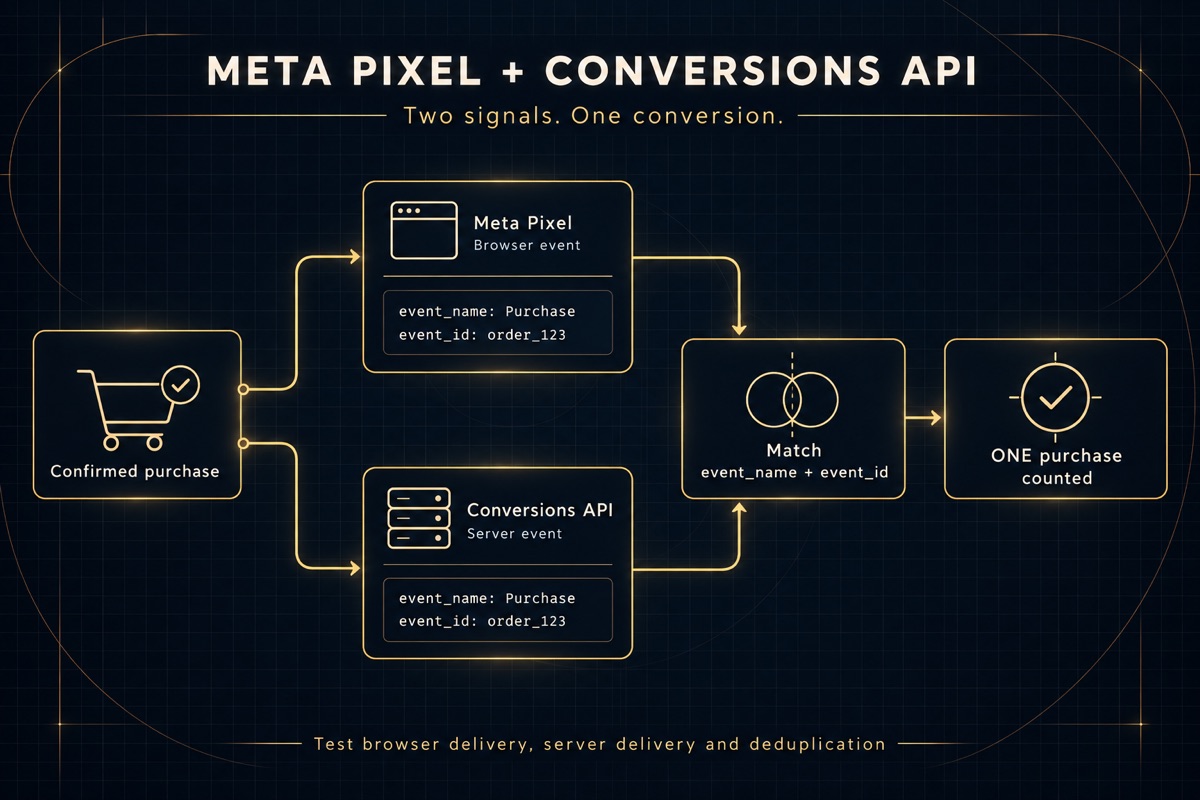
Browser Pixel and server Conversions API count one result once
Slide 25
Session 2

Test the actual completion

  • Accepted enquiry or confirmed payment triggers the result.
  • Verify the browser event and its server pair.
  • Check event name, ID, value and currency.
  • A page load or visible tag is not proof.
Slide 26
Step 3, 5 minutes

Make visitor consent work

  • Let Claude finish missing setup.
  • Check the course's EU, UK and Switzerland opt-in policy.
  • Accept, Reject and withdrawal control both tracking paths.
  • Review changes before production publication.
Slide 27
Step 4, optional background task

Install the bonus in another chat

  • The VSL agent writes a script, storyboard and short ad cut.
  • Use its public installer in a separate Claude Code chat.
  • Keep separate folders and your main chat on today's ads.
  • Skip this now if it distracts you. It is not needed today.
Slide 28
Step 5, 10 minutes

One offer for one buyer

  • Claude uses AIOS, voice and customer evidence first.
  • Choose one offer, destination and meaningful event.
  • Start simply inside the verified service area.
  • Approve the decision card.
Slide 29
Step 6, objective and budget

Give Meta the right job
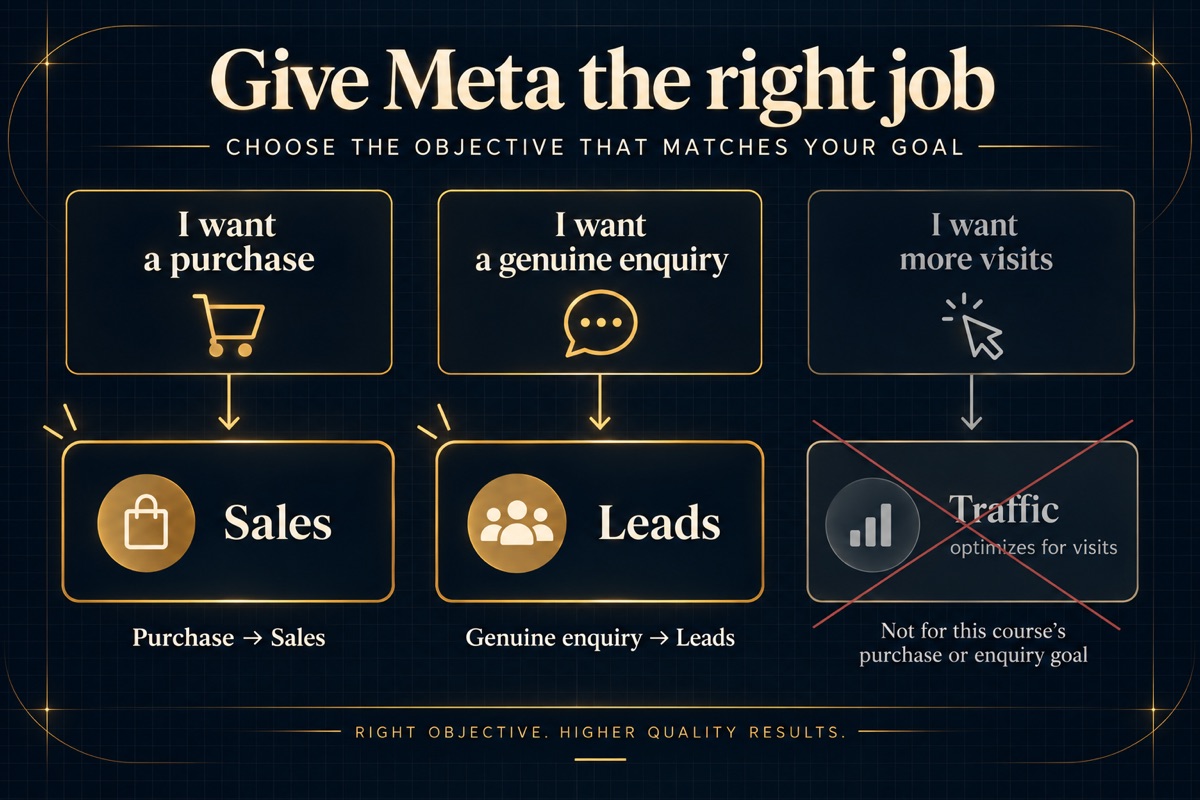
Sales for purchases, Leads for enquiries; Traffic excluded
Slide 30
Step 6, 10 minutes total

Choose the affordable test

  • Minimal: lower exposure, limited learning.
  • Ideal: balanced, grounded in real economics.
  • Push hard: tracking, economics and capacity must support it.
  • Approve total exposure and enforceable controls.
Slide 31
Session 2

Notice the hook, proof and next step
First course example
Second course example

Earlier Joe Che creatives, shown for their structure. Today’s campaign stays paused.

Slide 32
Step 7, create and review, 25 minutes total

Three hooks, words first

  • HookLab proposes three truthful hooks.
  • Write full copy for Static A, Static B and Carousel C.
  • Keep one offer, buyer, destination and CTA.
  • Revise until you approve each ad's words.
Slide 33
Step 7, continued

Approve, render, review again

  • Two statics and a three-to-five-card carousel.
  • Inspect every actual image at phone size.
  • Repair readability, spelling, crop, policy and brand problems.
  • Approve the final ads and save their real files.
Slide 34
Step 8, 3 minutes

Hook, meat, call to action

  • Hook: a reason for the right person to stop.
  • Meat: useful explanation, demonstration or genuine proof.
  • CTA: one clear next step matching the landing page.
Slide 35
Step 9, 2 minutes

Does the page keep the promise?

  • Claude uses the approved URL it already knows.
  • Compare the offer and CTA with all three ads.
  • Check mobile clarity, trust and the next step.
  • Reuse tracking evidence; label untested behavior honestly.
Slide 36
Step 10, 15 minutes

Publish and verify, PAUSED

  • Approve one campaign, one ad set and three ads.
  • Check actual connector capabilities first.
  • Use Ads Manager or approved computer use if required.
  • Read back all five real objects independently.
View your ads in Meta Ads Manager
Slide 37
Session 2

Save what actually exists

  • Campaign ID, ad-set ID and all three ad IDs.
  • Approved creative, destination, event, currency and budget.
  • Independent paused-state evidence and verification time.
  • Exact launch blockers for Session 3.
Slide 38
Session 2

Build your three-format batch

  • Reuse a reviewed one-pager and carousel.
  • Make one actual 30-to-60-second VSL with captions and a CTA.
  • Your second static can count as a fourth ad.
  • Add a fifth hook variation only if useful.
Open Session 2 post-session tasks
Slide 39
Session 2

Your first test is built

  • Tracking and consent have evidence or recorded blockers.
  • Your offer, audience and budget are approved.
  • Two statics and one carousel are reviewed.
  • The real Meta build is verified paused, or clearly incomplete.
Masterminds HQ members
Slide 40
Session 2
Return to the Session 2 guide

Can you find your three real paused ads?

What needs to pass before you turn anything on?

Midnight workstation for building an ad campaign
Slide 41
Session 3

Review and launch your ad test

Review your ads, build your audience plan and customer lists, check the full launch, then install a heat map.

Open the Session 3 guide
Slide 42
Session 3

What we are doing today

  • Review your VSL, ads and offer.
  • Build the audience plan and suitable customer lists.
  • Check the page, tracking and spending controls before approved launch.
  • Install a heat map and start collecting evidence.
Slide 43
Session 3

Choose who can see your ads

Broad prospecting and an approved customer seed lead to potential new customers, with relevant existing buyers excluded.
A lookalike is one audience approach. Check controls and expandable suggestions.
Slide 44
Session 3

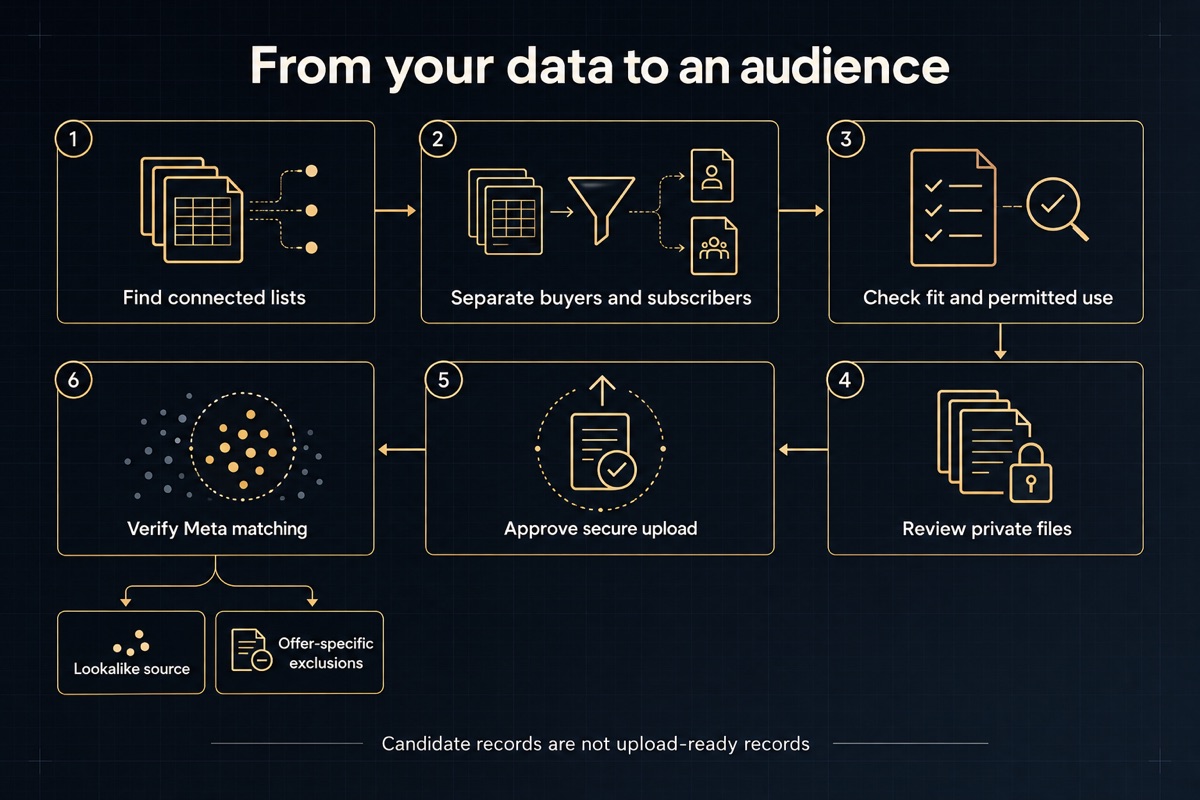
Build your audience lists

Find connected lists, separate buyers and subscribers, check fit and permitted use, review private files, approve secure upload and verify Meta matching.
Customer data is optional. Review private files and permitted use before any upload.
Slide 45
Session 3

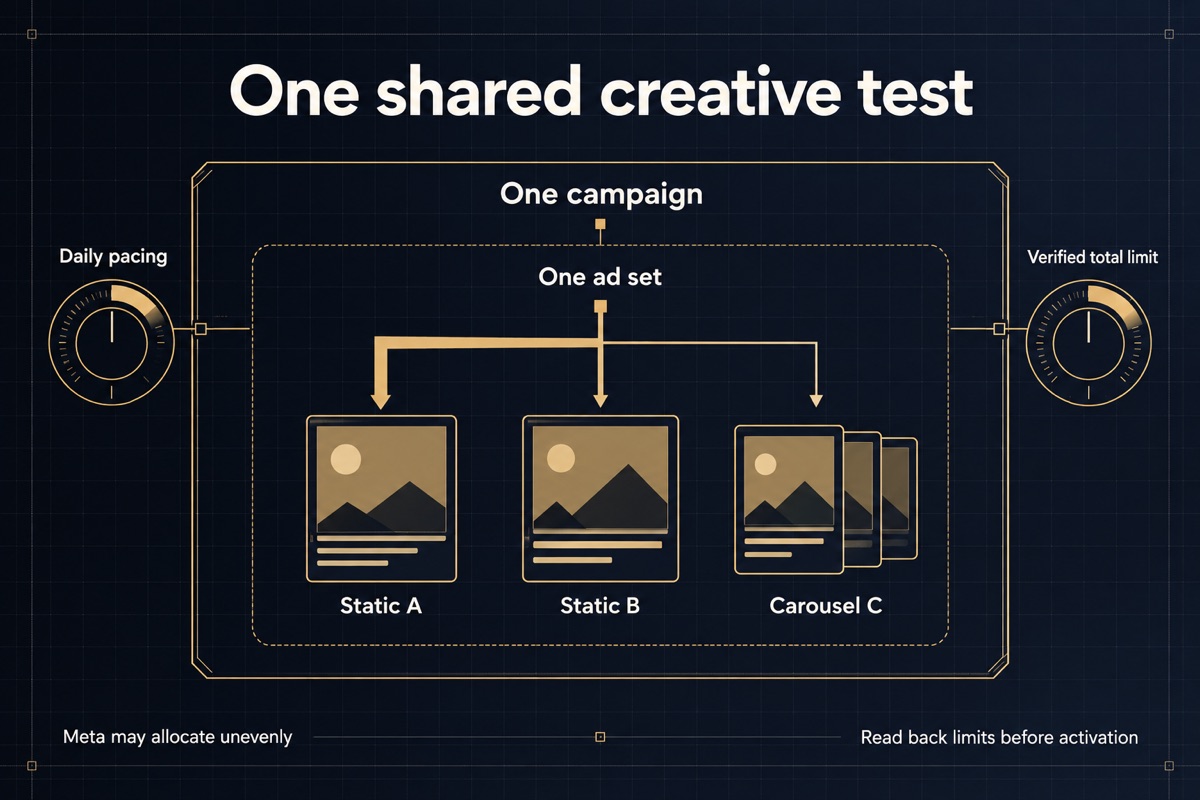
One shared creative test

One campaign contains one ad set with Static A, Static B and Carousel C, plus daily pacing and a verified total spending limit.
Three distinct creatives share one audience and budget. Meta may allocate delivery unevenly.
Slide 46
Session 3

Review everything before launch
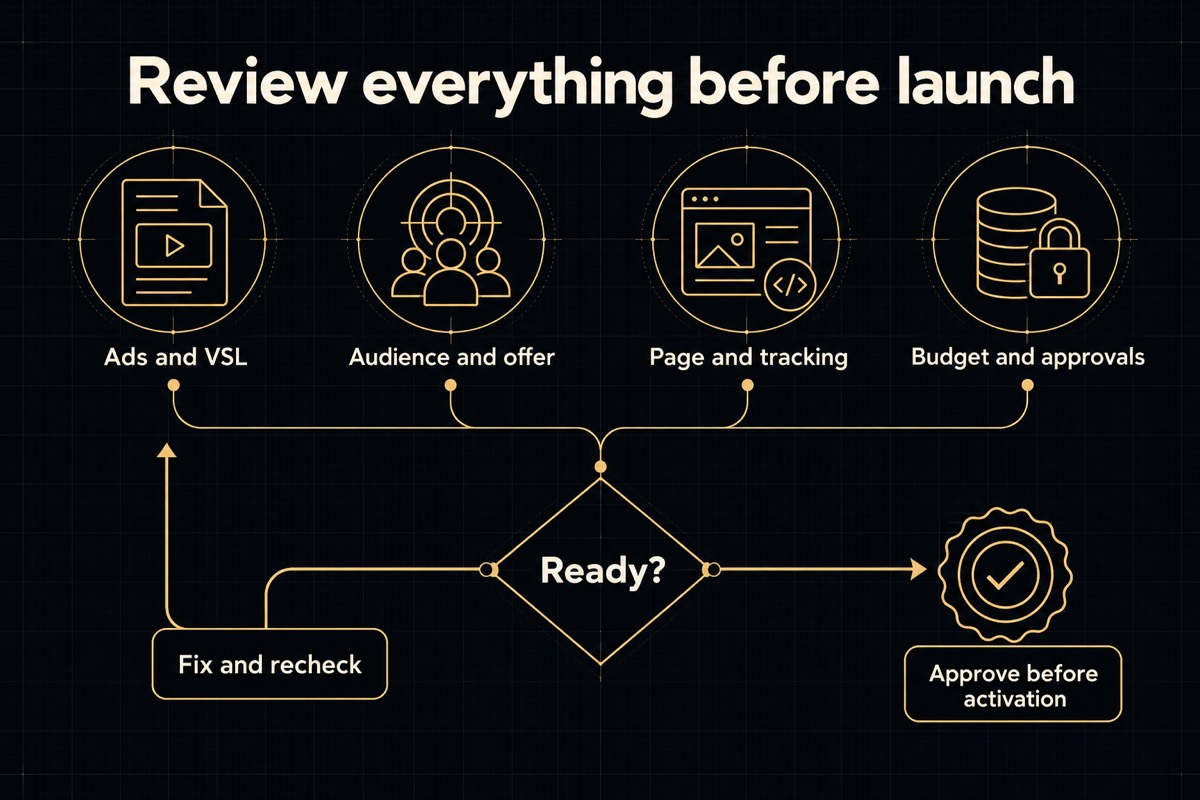
Four review areas converge into readiness, with a fix-and-recheck loop before activation approval
Review the whole test together. Fix missing checks first, then approve the exact launch.
Slide 47
Session 3

See what happens after the click
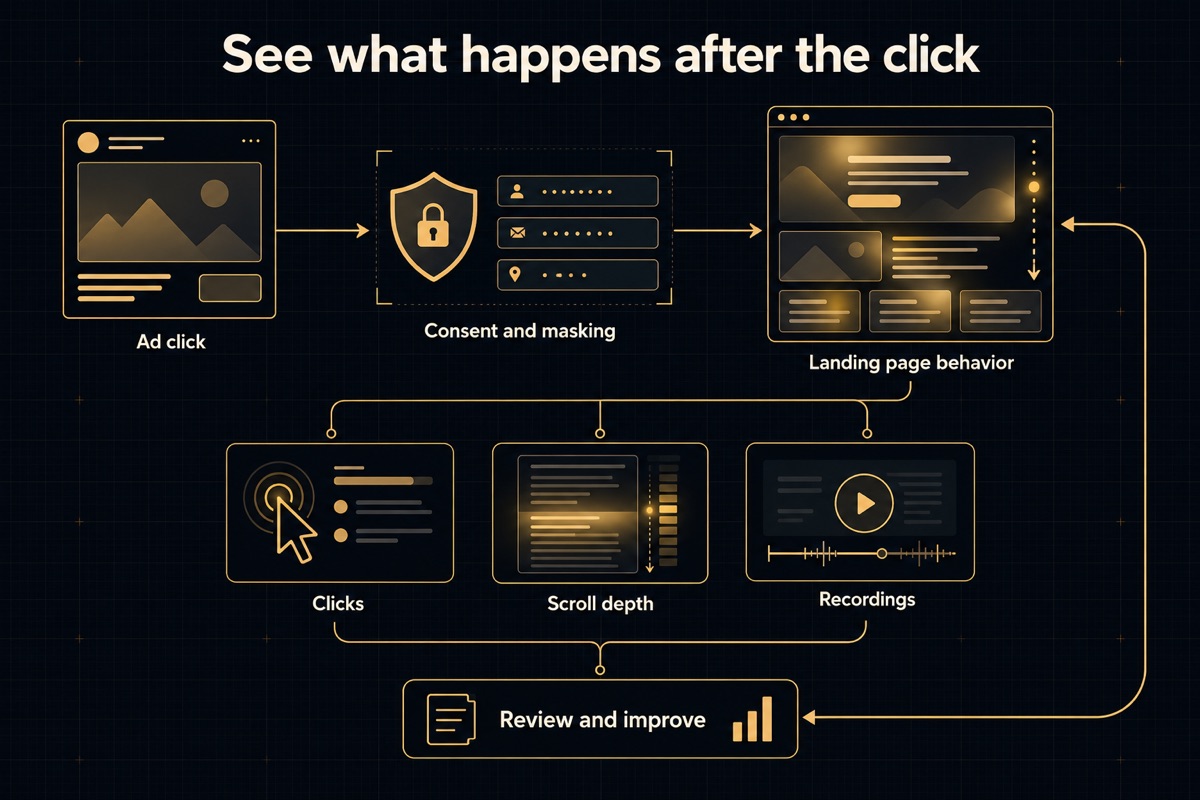
Consent and masking precede observing landing-page clicks, scroll depth and recordings, followed by a review loop
Meta shows the click. A heat map helps you see what happens next, with consent and masking checked first.
Slide 48
Session 3

Keep an eye on it every day

  • Check delivery, tracking and spend against your approved limit.
  • Save dated results, useful heat maps and lead or sales quality.
  • Keep talking to your Meta Ads Manager about useful tweaks.
  • Bring the evidence to Session 4 for our full review.
Open daily follow-up tasks
Midnight workstation for reviewing ad results
Slide 49
Session 4

Read your results and scale what works

Trust your numbers, find the friction point, then decide what to wait on, fix, pause or scale.

Open the Session 4 guide
Slide 50
Session 4

What we are doing today

  • Check your numbers and get one clean ad report.
  • Find where buyers drop out and prove which friction point it is.
  • Check your economics and lead quality.
  • Give each ad one label: wait, fix, pause or scale.
  • Save the next test and a weekly review.
Slide 51
Session 4

One prompt, every ad side by side
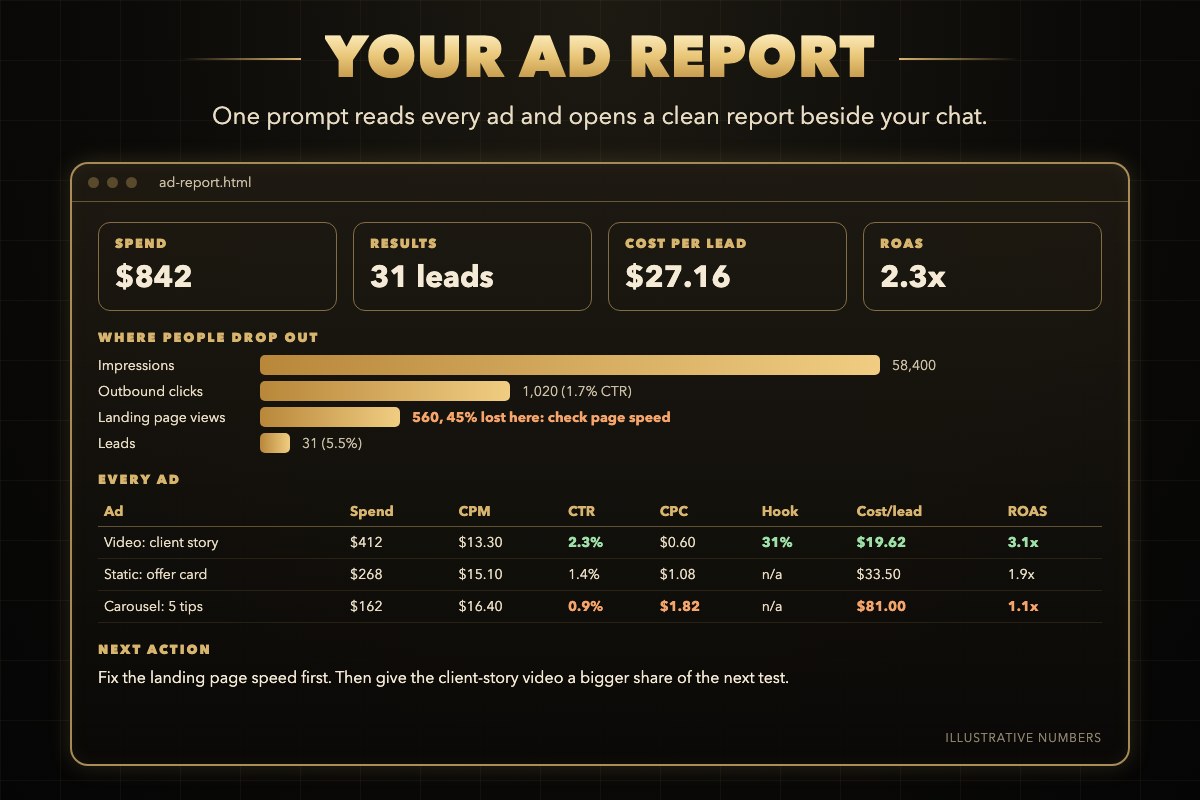
Example ad report with spend, results, cost per lead and ROAS, a funnel showing where people drop out and a table of every ad
Example layout with illustrative numbers. Yours uses your real results.
Slide 52
Session 4

Ads not working? Check the whole journey
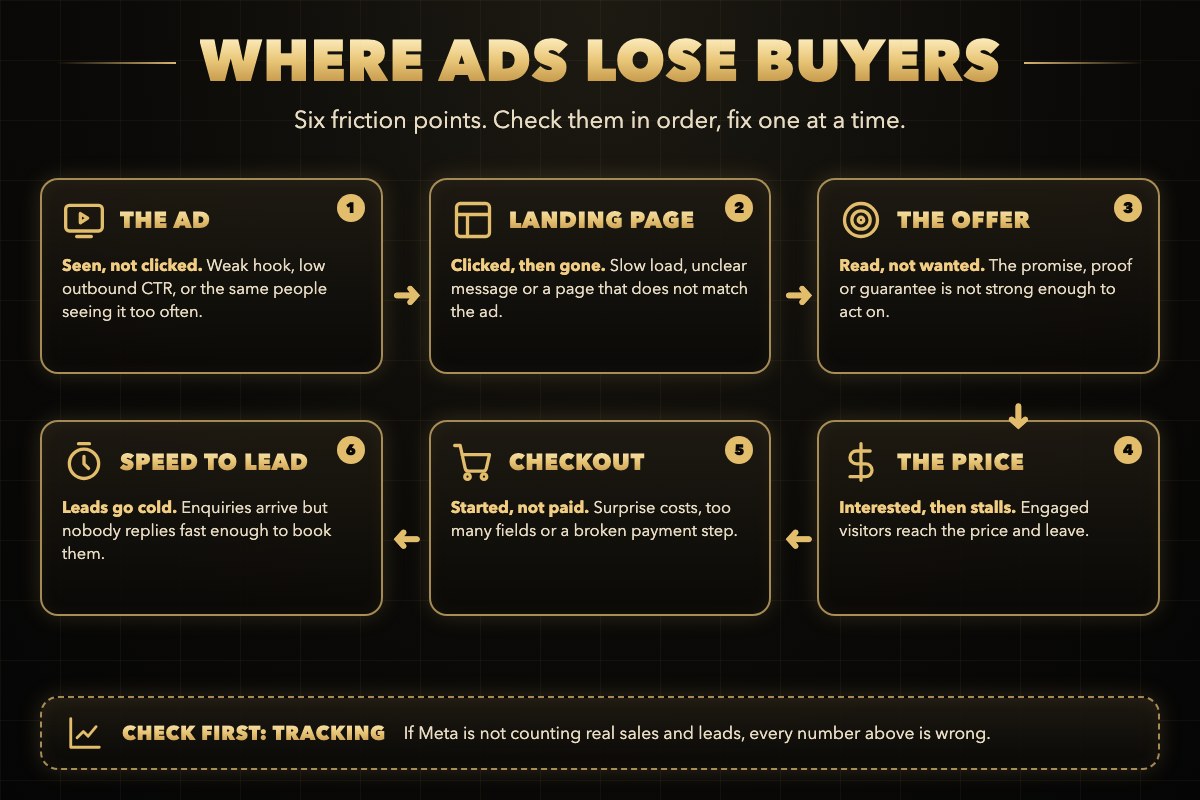
The buying journey as six friction points: the ad, landing page, offer, price, checkout and speed to lead, with tracking checked first
Check the journey in order and fix one friction point at a time.
Slide 53
Session 4

Read the symptom, run one small test
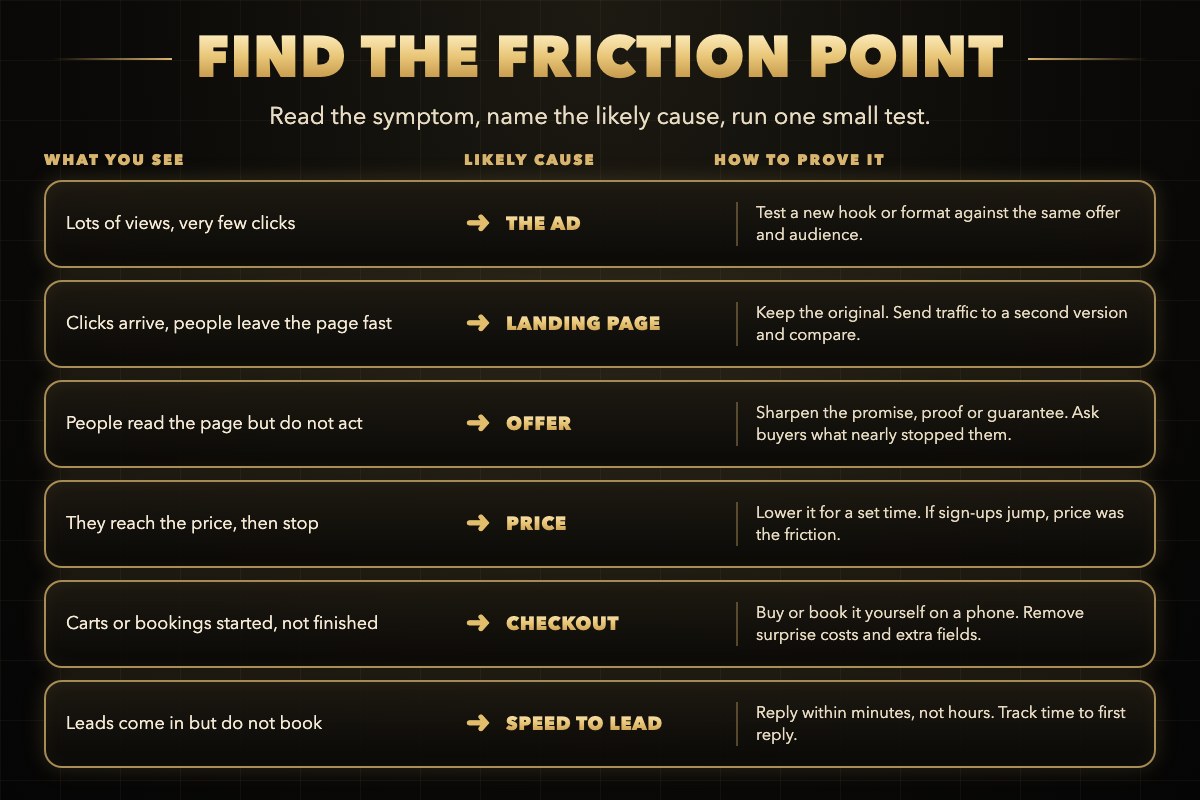
Symptom, likely cause and test for each friction point
What you see points to the likely cause. The test proves it.
Slide 54
Session 4

What can your business afford per result?

  • A cheap lead that never buys still loses money.
  • Work out your affordable cost per result from your real margin and close rate.
  • Check lead quality, not only lead count.
  • Missing rates stay unknown, never guessed.
Slide 55
Session 4

One label for every ad

  • WAIT: too early to judge, or already on target.
  • FIX: a tracking, creative, page or follow-up problem.
  • PAUSE: a proven poor performer or a reached test limit.
  • SCALE: trustworthy, affordable results with room for more.
Slide 56
Session 4

Change one thing, with approval

  • Pause the poor ad, not the whole campaign.
  • Scale only a supported winner, with an affordable limit and a review date.
  • Read every approved change back from Meta.
  • No supported winner means no forced scaling.
Slide 57
Session 4

Keep learning every week

  • Run your ad report on the same day each week.
  • Work through friction points one at a time.
  • Keep a dated change log inside your spending limit.
  • Fix tracking or lead quality before spending more.
Open the post-session tasks
Masterminds HQ members
Slide 58
Session 4
Return to the Session 4 guide

Which friction point will you test first?

What is your next weekly review date?